Toyota Camry 1997-2001: How to Unlock Radio
Anti-theft features are a convenience for you and your car's safety. Fortunately, your Camry's radio also has this feature by requiring a code for after re-installation. Unfortunately, if you don't know how to unlock it and want to replace the radio hassle-free, the anti-theft system might not seem all that great.
This article applies to the Toyota Camry 4th Generation (1997-2001).
Walking out to your car to find that your radio has been stolen is not a great feeling, and it's why many automotive manufacturers have incorporated many different types of anti-theft devices into cars for quite a few years now. The Toyota Camry has its own in the form of a radio "lock" feature, which renders the unit useless as well as unusable if and when the radio is removed from the console. But for those who aren't thieves and merely need to replace a broken/malfunctioning radio, this can be a bit of a problem. Luckily, unlocking a locked radio is easy to do if you know how. Keep reading as this article will guide you through the process.

Material Needed
- None (other than your fingers)
Step 1 – Obtain the reset code
Every Toyota radio has a six digit security code unique to its particular radio. This code can be obtained from Toyota for a $10 fee, and will be necessary to get the radio unlocked.

Step 2 – Unlock the radio displaying "SEC"
If your radio displays "SEC" when you power it on, first enter an incorrect 3-digit number a few times until the display shows "HELP." The number you use doesn't matter so long as it is incorrect, and it could take up to nine times before this occurs.
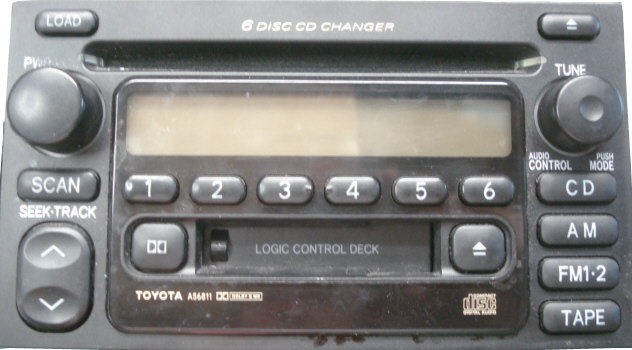
Press as well as hold the "tune up" (^) button and #1 preset button at the same time. Key in the incorrect number using the radio preset buttons 1-3. You must press each button multiple times to get to the corresponding number. For example, to get the number 5, you must press the #1 radio preset five times. Press and hold the "tune down" button and the #1 preset button at the same time to enter the code again until your display shows "HELP." Then move on to Step 3.
Step 3 – Unlock the radio displaying "HELP"
Press and hold the "tune up" (^) button and the #1 preset button at the same time. Key in the correct unlock security code you received from Toyota using radio presets 1-3. You must press each button multiple times to get to the corresponding number, just as you did in Step 2. For example, to get the number 5, you must press the #1 radio preset five times. The radio should now be unlocked and functional.
Featured Video: How to Enter Codes
Related Discussions
- Camry Radio Unlock Instructions - CamryForums.com
- Camry Radios Discussion - CamryForums.com