


Multi-Diag for diagnosing


Thread Starter
|
Member
Joined: Sep 2011
Posts: 67
 Multi-Diag for diagnosing
I use ACTIA Multi-Diag to diagnose my car, for maintenance, A/C,Pollution control,Body,Brake system, Motor system,etc.
Till now it works well.
Video on How to use Multi-Diag:
how to setup multi-di@g access j2534 pass thru.avi - YouTube
Multi-Diag serial number setting:
During installation, when Multi-Diag configuration window appears, we should set Communication interface to USB and set VCI serial number to A070026:

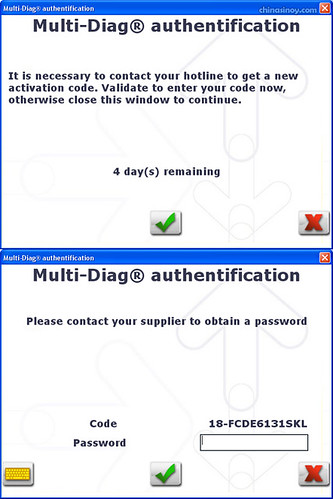
After installation, MultiDiag shows message asking to get activation code. Click the tick button. Enter the password and click the tick: (passwork come from supplier, tell them the code 18-...)
During diagnosing with the device connected, a warning about 0 days left will appear. Just check the mark “Do not display this message again” and continue the work, everything will be working ok:

Till now it works well.
Video on How to use Multi-Diag:
how to setup multi-di@g access j2534 pass thru.avi - YouTube
Multi-Diag serial number setting:
During installation, when Multi-Diag configuration window appears, we should set Communication interface to USB and set VCI serial number to A070026:
After installation, MultiDiag shows message asking to get activation code. Click the tick button. Enter the password and click the tick: (passwork come from supplier, tell them the code 18-...)
During diagnosing with the device connected, a warning about 0 days left will appear. Just check the mark “Do not display this message again” and continue the work, everything will be working ok:

Thread
Thread Starter
Forum
Replies
Last Post
rendy redford
Audio/Visual Electronics
20
May 26, 2015 07:39 AM
smithsonian
Suspension, Brakes, Tires & Wheels
2
Nov 21, 2011 11:00 AM


